
How to Write Blog Posts That Rank on Google
Most blog posts never get found.
The reason behind this failure isn’t the quality, the topic, or even the target audience.
This is simply because the post was never set up to rank in the first place.
Writing content is one skill. But writing content that actually ranks on Google is a completely different skill.
And most bloggers never take the time to actually learn it.
It’s my 43rd blog post on this blog. And every single one taught me something new about what Google actually prioritizes.
Here’s what actually works. And what doesn’t.
Why Most Blog Posts Don’t Rank
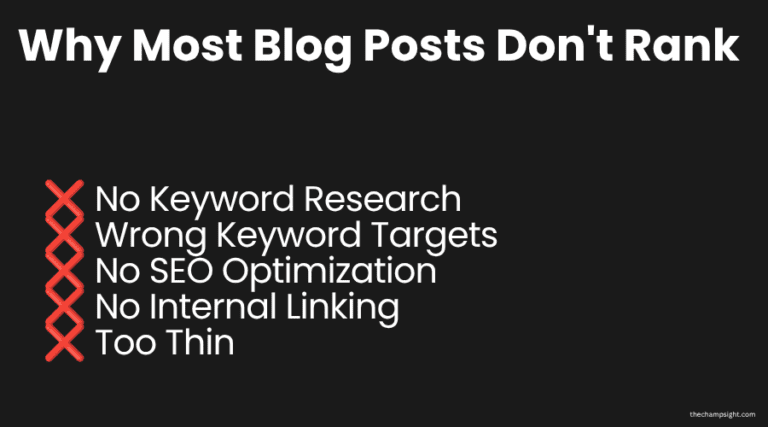
Before learning any strategies, you need to realize why most blog posts don’t rank, no matter how well written they might be.
No Keyword Research
The post was written about what the author wanted to write, not because of search intent.
Before you choose the post, understand if there are people who search for it.
Good content with no search demand gets no traffic regardless of quality. If there’s no one searching for your title, then it won’t be clicked.
Wrong Keyword Targets
The blogger targeted keywords dominated by the biggest websites out there, whether it’s Forbes, HubSpot, or even Vogue.
A new blog competing with those sites for broad keywords will never win. Not even after the first year.
Those are websites with thousands of backlinks, experts on copywriting, SEO research, web design, and many more.
No SEO Optimization
If your title, meta description, URL, and even images aren’t properly set up, Google can’t understand what the post is fully about.
And even if it ranks, it can be the wrong search.
Take the time to learn SEO, even if only the basics.
No Internal Linking
The post sits alone on the blog with nothing connecting it to the rest of the content.
Google sees it as isolated and ranks it lower than interconnected content.
Make sure to link your posts to others, this is the most important thing for bloggers.
Because you only need one post to go viral, the rest will be attracted by that one.
But if you don’t give directions to your audience to see other posts, a big majority won’t go by themselves.
Too Thin
A thin post answers the question but doesn’t go deep enough to fully satisfy the reader.
Your post must answer people’s needs. Google rewards comprehensive content that satisfies search intent.
One of my older posts started receiving impressions only after I expanded the FAQ section and improved internal links.
You covered the what, but not the how.
Your mission is not to let the reader have more questions about a specific subject.
Instead of him going back to Google because he couldn’t find the answer to all of his questions, make sure to have them in your post.
Otherwise, Google will see it as a signal that your post isn’t the best.
Step 1- Start With the Right Keyword
Never write a post without doing keyword research. Never.
Keyword research tells you what people are actually searching for.
Not what you think they are searching for.
And if you never decide to do that, your blog won’t be able to grow, not until it reaches its potential.
How to Do It For Free
People Asked
This is one of the main websites I use when researching a keyword.
You can either type a word or even a full sentence.
Your post should answer the questions this website shows you, and that’s because that’s what people actually ask.
AnswerThePublic
Like the website above, you can use these websites to find section ideas or even related keywords.
When I’m choosing what post I’ll be writing about, I try to use both for more options and alternatives.
Ubersuggest
Ubersuggest is the software I use to check if I actually have any chance of ranking.
Because it doesn’t matter if people are asking some questions, if you can’t rank for it.
Before spending hours writing the best post you can write, check if you have any chances of actually succeeding.
Google Trends
You can use this to see real-time and daily searches, and whether it’s spiking or not.
At the same time, you can also check by location, depending on your target audience.
What to Look For
Long Tail Keywords
Instead of trying to rank for something like “how to earn money online”, focus on long tail keywords.
Something that incorporates your niche, whether it’s sports, money, mindset, or even travel.
The more specific you are, the less competition you’ll face.
Reddit or Quora on page 1
If there’s Reddit or Quora on page 1, this usually means the posts aren’t as good as Google wants them to be.
This is your chance to build a strong post that answers people’s questions and needs.
This is a sign that you can focus on this keyword and actually have a chance to succeed.
Step 2- Understand Search Intent
Search Intent is what people want when they type a keyword on Google.
You must match the intent, your post won’t rank, no matter how well optimized it is.
Google’s job is to show people the most relevant results for what they typed.
There are four types of search intent.
Informational
Informational search intent means that people are looking to learn something.
In my niche, this usually means “how to start a blog” or “ways to make money online”.
This is a sign to make educational content.
Although you can also make it transactional, the main interest is to learn, not spend money.
Transactional
This is when people want to buy something.
“Best hosting for beginners”, or “best mindset books.”
People are searching with the intent to buy, not to learn.
Navigational
This happens when people want to find a specific website.
This happens when they type “Facebook login”.
Investigational
The last one is investigational, people are looking for options.
They compare them and analyze what’s better for them.
“Bluehost vs Hostinger”, or “Bing or Google for beginners.”
How to Match Intent
When you type your interested keyword, what appears on the first page?
Is it how-to guides, comparisons, or listicles?
Whatever dominates this page is what Google believes matches the intent.
Make sure to match their format correctly.
Step 3- Write Content People Actually Need
Learning how to choose a keyword is the first step.
The next step is to write content that matches their intent.
Don’t be like most bloggers.
Don’t answer the surface question and stop exploring it more.
Most readers have more questions, and it’s your mission to answer them correctly.
If they come back to Google to search for more questions related to your keyword, it’s a sign your post didn’t fulfill their needs.
How to Write Content People Actually Need
Answer all of their questions.
Like I’ve been saying all over this post, you should answer all of their questions.
There aren’t enough questions.
If you think someone might ask this, write about it.
It’s better to cover everything rather than leave a blank space.
Watch your completion, go deeper than their post.
Include your perspective, your mistakes, what went well, and what you would’ve changed if you had another chance.
People learn from others’ mistakes. If you think something relevant happened to you that can be used for others to improve, use it.
Step 4- Write for Humans First
Before this step, everything was about what to write.
This step is about how to write it.
SEO optimization matters more than most posts.
But the problem is that if you write your posts for an algorithm rather than an actual person, there’s a big chance readers will leave immediately.
And Google hates when people leave immediately.
Write As You Talk
I’m not saying you should write perfectly formal. And surely not stuffed with jargon.
But I recommend you write it like you would when you’re explaining something to a friend.
It’s more engaging with your natural voice rather than a forced version of you.
Be Specific And Honest
Instead of saying something in general, talk about your personal perspective.
Instead of: “Results may vary.” Say “I contacted 100 businesses in the last month, 3 replied.”
Many other blog posts have vague and generic data, understand why yours is different and better.
Give them a new perspective. More than honesty, it builds trust, and that’s what keeps people reading.
Don’t Write For Word Count
There are thousands of people on forums like Reddit saying that fewer than 800 words and more than 1800 words are too much.
Even when I started, I tried to get every post with more than 1300 words.
I always tried to add something new and different, but most of the time I ended up talking about the same thing over and over again.
A comprehensive 1,300-word guide is much better than a 3,000-word guide full of spam, generic, and repetitive posts.
Every sentence must earn its place.
Add Personality
Your blog is personal, without personality, it sounds like a generic blog.
People will just say that it is just another blog.
And generic content from faceless bloggers is just another post.
Your posts should feel like they were written by a real person with real opinions.
Specific advice from someone you feel you know is memorable.
Step 5- Structure Your Post for Readability
You need to understand that Google reads your post structure to understand what it covers.
And readers decide if it’s worth reading.
This Is What Most People And I Use
H1 – Main title. Only one per post.
H2- Your main sections. Each major topic must have its own H2
H3- Subsections within each H2
Depending on the subject, I can also use H4 for topics within H3.
Paragraph length
I don’t recommend or advise anyone to have more than 3 sentences per paragraph.
You need to understand that, according to GS StatCounter, 52% to 65% of all Internet visits are from mobile devices.
When you write more than that, people won’t read it, and they won’t be able to focus because it seems too much.
You can’t control whether people are going to end up on your page.
But if they do, it’s your responsibility to keep them there as long as you can.
If you can do that, Google will see your content as valuable.
Keyword in The First 100 Words
Tell Google what your content is about.
Include your keyword naturally in the intro, this way, Google and your readers will know the context of the post.
SEO is crucial, and if you aren’t focusing on that, your chances of being ranked are even smaller.
Make It Scannable
Use bold key points, headers, and short paragraphs.
If readers find out what they are looking for, they will stay longer.
Do everything you can to make Google see your post as valuable.
Step 6- Optimize Your Post for SEO
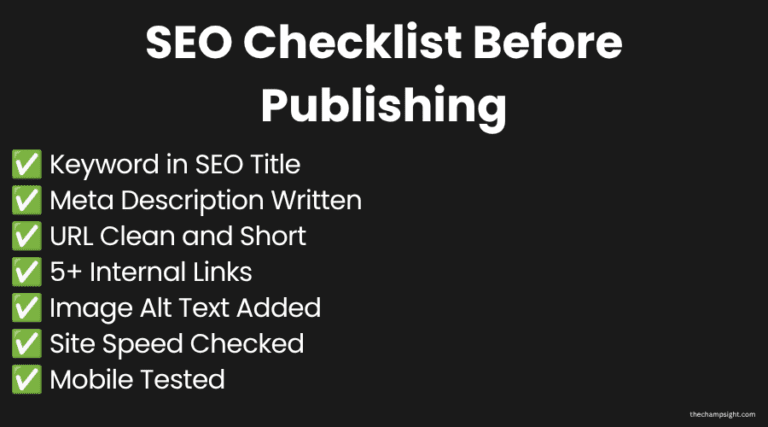
Like I’ve been saying in this post, SEO is one of the most important aspects of Google ranking.
Most bloggers don’t think SEO is for them yet, and even if they don’t skip SEO, they do it incorrectly.
SEO Title
Include your target keyword. I like to keep it below 60 characters.
Meta Description
I like to do 150 to 160 characters. Include your keyword naturally.
Make it compelling.
This is where I use AI to help me structure it the best way possible.
I’m not saying you should, but according to my experience, AI is much better than I am at this.
URL
Short and clean. Include your target keyword. No dates or random numbers.
Internal Linking
This is the most important step for beginners.
If one post ranks, you need to guide your audience through your blog completely.
Don’t expect them to go to the home page or even the blog page on their own.
I always recommend at least 5 internal links per post linking to related content.
Every time you publish a new post, make sure to go to older ones and update their internal linking.
Headers
As I stated earlier in the post, make sure to structure your post using H1, H2, and H3 for readability.
Site Speed
Would you stay on a slow website? A website that takes more than 5 seconds to load?
If the answer is no, why would anyone stay in yours?
Make sure to compress your images and remove some of the excessive plugins.
Use only what you need, you don’t need 30 plugins.
This is why I recommend Hostinger; their servers are optimized for WordPress speed out of the box.
The only reason people stay on slow websites is in a moment of rush or fear.
They are rushing to buy some tickets for a concert.
They need to pay a fine, so they wait.
Most of the time, that won’t happen on your website.
Improve its speed.
Mobile Optimization
Like I stated earlier, more than 52% of Google Searches happen on mobile devices.
If your blog doesn’t function properly on mobile, then you’re losing more than half your potential traffic before writing a word.
You must check every post you write on mobile the moment you publish it.
Does it load properly? Is it fast? Can you read the text without zooming? Do images load correctly?
Most WordPress themes are responsive for mobile by default, but it doesn’t take you long to check it after each post.
Ranking on Google is one of the best long-term traffic sources for a new website.
If you’re still struggling with your blog, check out my free blogging checklist
Step 7- Update and Improve Old Posts
Most bloggers focus on new posts, but they completely forget older ones.
Older posts are already indexed and may already be ranked.
Improving them is often faster than writing newer posts for the same ranking improvement.
What to Do
Go to Google Search Console and find posts between positions 10 and 25.
These are the closest to page 1.
A post on position 8 gets many more clicks than a post on position 15, which is on page 2.
Improve internal linking, SEO title, meta description, and keyword target.
Improve sections that aren’t updated or too thin.
Add new information that wasn’t in the original post.
I try to update one post every 2 weeks to a month.
I recommend that you update one post every week.
This can improve your blog traffic more than just writing new posts.
What I Do Before Publishing Every Post
Before I hit publish on any of my posts, there is a checklist I like to do first:
- Keywords researched and confirmed winnable
- SEO title includes a keyword and is under 60 characters
- Meta description includes a keyword and up to 150-160 characters
- URL is short and clean with the keyword included
- Keywords appear naturally in the intro
- Minimum 5 internal links
- Mid-post newsletter
- All images have alt text written
It takes 10 minutes. This is for every post, no exceptions.
Biggest SEO Mistakes Beginners Make
Targeting Keywords That Are Too Competitive
Focus on targeting long tail keywords instead of a generic one.
“How to make money online” is not a keyword a new blog can ever rank for.
When starting, long tail keywords such as “How to make money online for beginners” or even smaller than that should be your focus.
Writing Posts Without Checking Search Intent
Writing a personal opinion post for a keyword that wants a guide is the worst thing you can do.
You’re not matching the right format, and that will kill your ranking before they start.
Ignoring Internal Linking
Publishing post after post without any connections between them is like making a new blog.
It’s like your content library is a collection of isolated pages instead of an interconnected website.
Never Updating Older Posts
Your oldest posts are your biggest ranking opportunities.
They might already be ranked.
Ignoring them while creating new content is leaving ranking chances on the table.
Copying What Big Websites Already Do
Big websites are on a different scale than you are.
They can rank for anything because of their domain authority. New blogs can’t.
If you see their content, they have less than 1,000 words, but they are still on the first page.
They have too many backlinks and years of domain and a team full of experts behind every piece of content they create.
Building traffic takes time. I share everything I’m learning about SEO, blogging, and online business every week.
How Long SEO Actually Takes
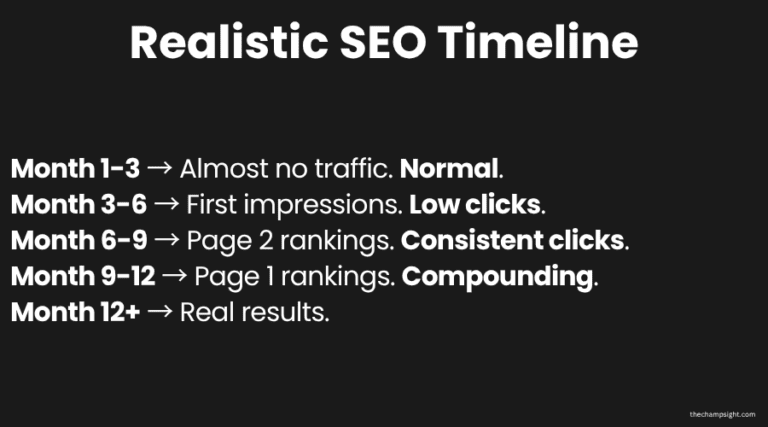
This is the section most blogging guides skip because the honest answer isn’t as exciting as beginners want it to be.
Here’s a realistic timeline for a new blog publishing consistently.
Month 1-3
Almost no organic traffic. Google is figuring out what your blog is about.
This is normal. Keep publishing.
This is the phase where most bloggers quit because they thought it would be much faster than reality.
Month 3-6
You’ll start to see impressions appearing for real keywords. Some posts have already moved from position 40+ to position 20, and in some cases, even lower.
Still very low clicks.
In this phase, you must be patient. It’s the hardest phase, even worse than the first one.
Your motivation might be zero, you’re feeling overwhelmed, and you’re almost quitting.
But this is where you should keep going.
Month 6-9
First posts breaking into page 2.
Occasional page 1 ranking for very specific long tail keywords.
Clicks are starting to become consistent.
Continue focusing, your hard work is finally paying off.
Month 9-12
If everything was done right, as I told you to, you will start to see multiple page 1 rankings.
SEO is starting to compound faster because your domain has built trust in Google.
Month 12+
Real compounding.
Every post you publish in silence starts paying off simultaneously.
You Can Accelerate The Process
Social media and forums can accelerate this process much faster.
Focusing on building a personal brand or even a community on these forums will lead them to your blog.
Provide real value and don’t expect anything back from them.
Posting on social media will make it faster, too.
I recommend you post on Pinterest, it’s the best platform to get traffic in a consistent way.
It will also take time, but it will be worth it.
What’s Working for Me Right Now
I’m not writing this from the other side of success.
I’m also on the same path as you.
And this is what’s actually working for me:
If you want more insights about productivity, mindset and building an online business, consider joining my newsletter.
Targeting Long Tail Keywords With Weak Page 1
Every post I write, I check if Reddit or a small blog is ranking on page 1.
I use all the tips I told you to use. Nothing different.
That might sound basic, but the basic works.
Don’t try to overcomplicate everything.
Pinterest for Early Traffic
While SEO builds in the background, I use Pinterest to find early impressions and even traffic from day one.
I keep publishing two pins per day.
I recommend five pins every day, but if you can’t be consistent with it, stick with two.
Updating Old Posts
There were posts from month 1 that were written before I understood SEO properly.
Images weren’t compressed, and neither had alt text.
I fixed them, and impressions climbed.
At month 3 or 4, SEO hasn’t had enough time to compound, at least that’s what the results tell me.
But progress still happens in different ways.
Even after multiple rejections, I eventually got approved by Google AdSense because I kept improving the site instead of quitting.
Final Thoughts
Writing blog posts that rank on Google is not complicated.
It’s a checklist. You need to do the keyword research before you even think about writing.
Match the search intent. Write content that satisfies the reader’s needs.
Do everything I write consistently, not perfectly. Google will eventually reward it.
The bloggers getting traffic aren’t more talented than you. They learned and applied everything along their journey.
Now you have the checklist too.
Frequently Asked Questions
How long does it take for a blog post to rank on Google?
Most blog posts take several months to rank, especially if you’re just starting.
While some posts may start receiving impressions within a few weeks, meaningful traffic often takes 6 to 12 months of consistent publishing and optimization.
How many words should a blog post have to rank?
There is no perfect word count for blog posts. The main priority is making the post long enough to cover and answer the reader’s questions.
Some topics may need 1,200 words, and others more than 2,000.
Quality matters more than word count
Can a new blog rank on Google?
Yes, new blogs can rank on Google.
But this usually happens when bloggers focus mainly on long-tail keywords with lower competition.
What is the most important SEO factor for blog posts?
There isn’t a single ranking factor that matters most. You need strong keyword research, matching search intent, helpful content, and internal linking.
Do internal links help SEO?
Yes. Internal links help Google understand the structure of your website and related content.
Guiding your users to useful articles makes them stay longer on your website.
Should I update old blog posts?
Absolutely. It’s one of the most important things you can do as a beginner.
It helps improve the ranking of older posts faster than just creating new content.
How often should I publish blog posts?
There isn’t a right number. In the end, consistency matters more than the number of posts.
If one week you publish 10 articles and the next one only one, it doesn’t help your website at all.
It’s better to follow a schedule you can maintain long-term
Is SEO still worth it for new bloggers?
Yes. SEO remains one of the best ways to generate long-term traffic. Social media usually disappear within days, a well-ranked blog post can and will continue to bring more visitors for months or even years.
Subscribe for More Business Insights
You May Also Like